
Aviation scheduling software that staffs every flight wave
Workofo plans ramp, check-in, security and baggage teams around the flight schedule, applies your labor rules and re-plans when flights change.

Flight schedules move by the minute. Most rosters don't.
Fixed rosters can't keep up with flight waves, delays and certification rules. Workofo can.
See how it worksWaves, not averages
Arrivals and departures come in banks. Staffing evenly across the day leaves gaps at every peak.
Plans staff per 15 minutes around every flight wave.
Licences on every shift
Ramp, security and de-icing roles need valid training, badges and airside access.
Applies skills and qualification rules to every shift.
Delays move everything
A late inbound or a weather disruption shifts the whole wave and the roster with it.
Re-plans quickly when the flight schedule changes.
Flights in, rosters out. Planned in four steps.
Workofo is employee scheduling software that turns the flight schedule into staffing plans. It tests millions of roster variations against your rules and picks the one that fits.
- 01
Load the flight plan
Flight schedules, seasons and service agreements set the workload for every team.
- 02
Apply the rules
Licences, rest rules, union agreements and airside access are enforced on every shift.
- 03
Optimize rosters
Millions of variations are tested to find shifts that match every wave.
- 04
Handle changes
Re-plan affected shifts when flights move, without starting over.
One roster for the apron and the terminal.
See where each team is short or over in a typical week, and how Workofo moves the hours.
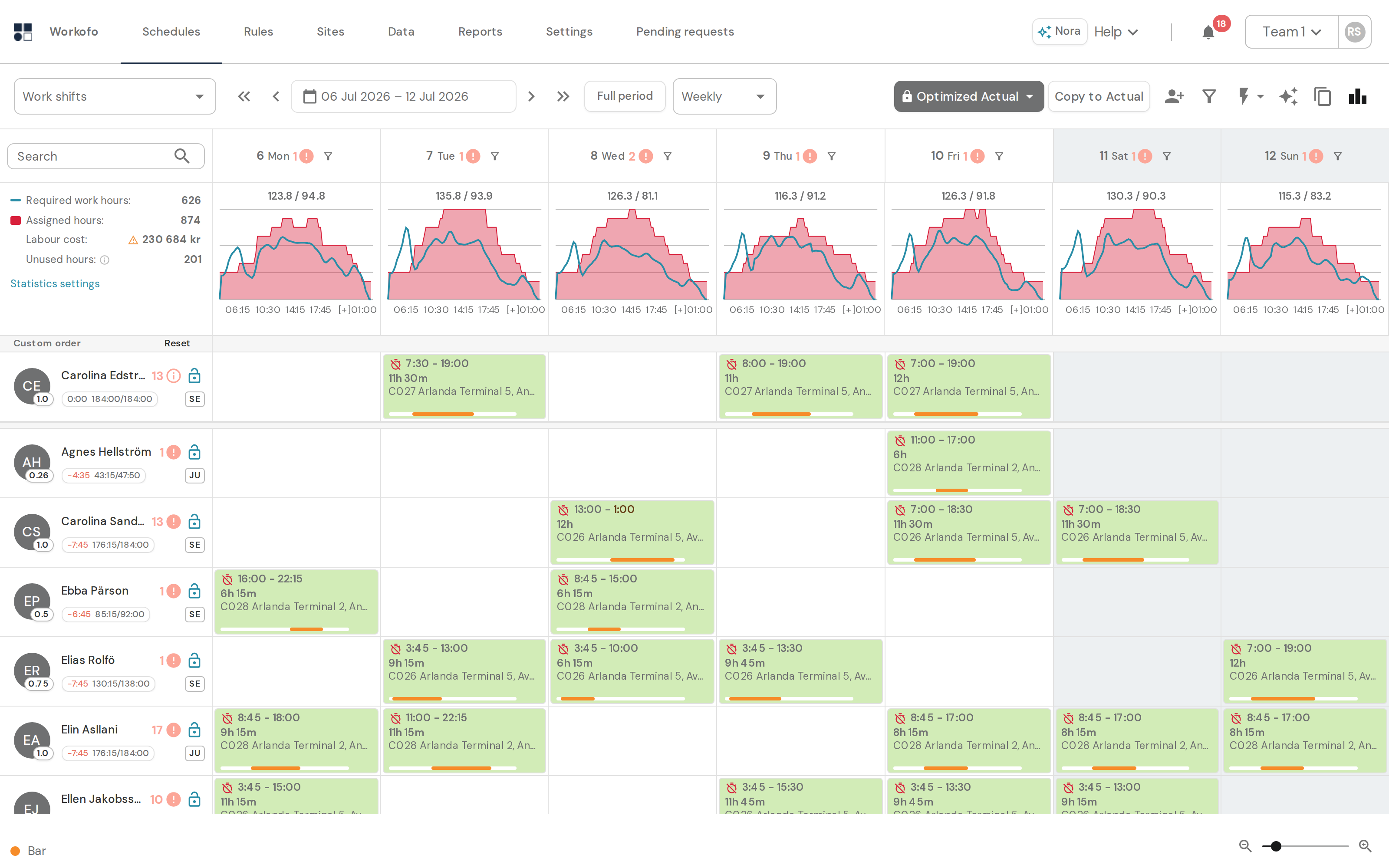
Every flight wave, covered in one view
Compare required and assigned hours through the day, terminal by terminal, and apply the optimized roster when it fits.
-
Every wave in view
Required and assigned hours across the day, for each day of the week.
-
Terminals side by side
Plan staff for every terminal and team in the same schedule.
-
From optimized to live
Review the optimized roster and copy it to the live schedule in one step.
Aviation scheduling app for supervisors and ground staff
Ground staff check rosters, share availability and trade shifts in the Workofo app for iOS and Android. Supervisors approve changes from the apron or the office.
For ground staff
For supervisors
Aviation scheduling, answered
Not sure Workofo fits your station? We'll show it with your own flight plan and rules.
What is aviation scheduling software?
Aviation scheduling software builds rosters for ground staff around the flight schedule instead of fixed shift patterns. Workofo plans ramp, check-in, security and baggage teams in 15-minute intervals around every flight wave.
Who is Workofo built for in aviation?
Airport operators and ground handling providers that schedule large shift-based teams across terminals, stations and roles.
How does Workofo handle delays and schedule changes?
When the flight plan changes, Workofo re-plans the affected shifts and suggests changes, so supervisors don't rebuild the roster by hand.
Can Workofo plan around licences and certifications?
Yes. Skills and qualification rules are part of every roster, so only staff with the right training are planned for each role.
How much time can we save?
Clients save up to 80% of the time spent on scheduling and admin. Labor savings depend on your operation, so book a call and we'll calculate them with your own data.
Does Workofo cover more than the ramp?
Yes. Check-in, security, baggage handling and airport retail can be planned in the same system.
Does Workofo follow working-time rules and union agreements?
Yes. Rest periods, maximum hours and local agreements are applied to every roster.
Do supervisors keep the final say?
Yes. Workofo proposes the roster; supervisors review, adjust and publish it.
Is there an app for ground staff?
Yes. Staff check rosters, share availability and trade shifts in the Workofo mobile app.
Does Workofo connect to HR and payroll?
Yes. Workofo connects to your HR and payroll systems, so approved hours flow straight to payroll.
Book a demo built around your flight plan.
Share your flight schedule and rules, and we'll show you the roster Workofo would build.
We'll get back to you about your demo.